 Aicon-Platform
Aicon-Platform
Aicon-Platform
AI-assisted engineering for energy optimization, industrial automation and digital infrastructure.
A real run, captured start to finish — not a mockup. Pick a vendor, an industry and a couple of equipment counts, and the rest is generated for you.
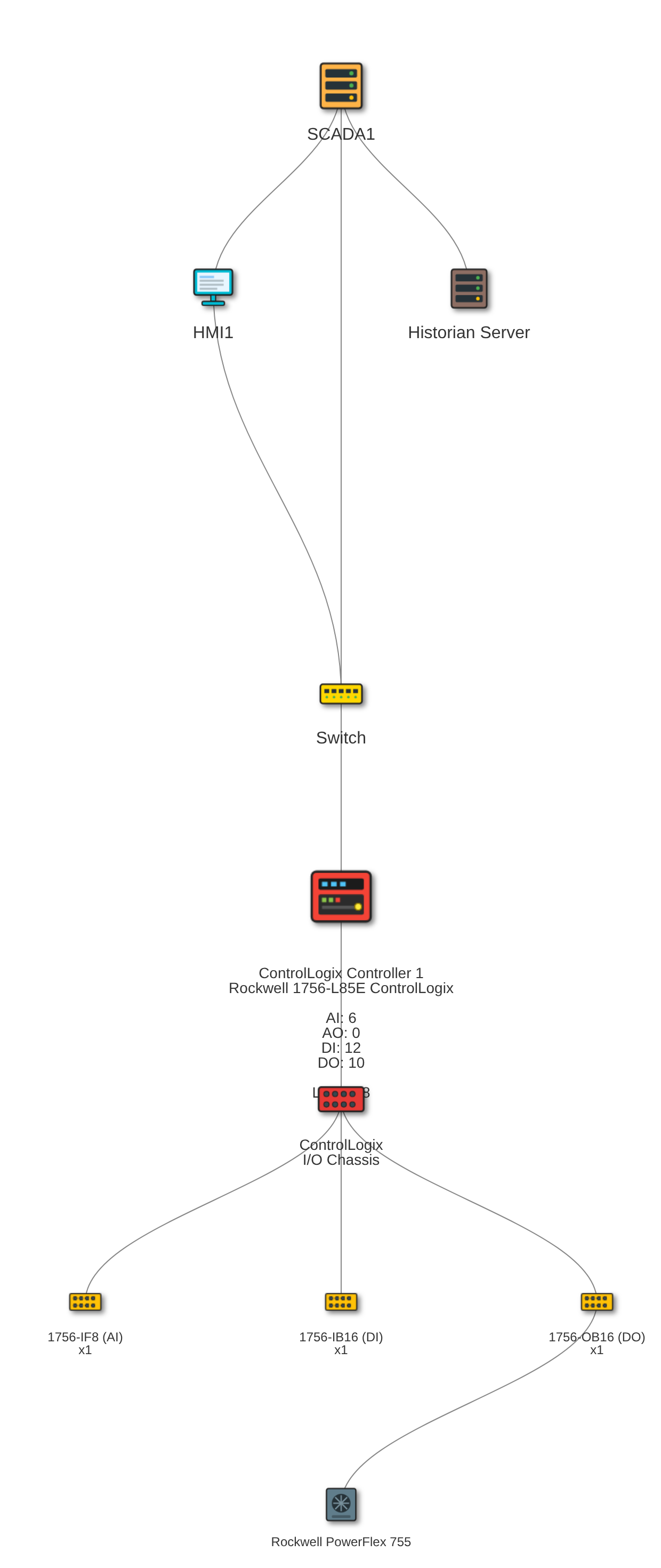
⚠️ On this exact run, 9 of the 28 generated I/O points were automatically flagged for review — see the trust strip above.
Both panels come from the same generated report — a full PDF proposal, ready to hand to a customer.
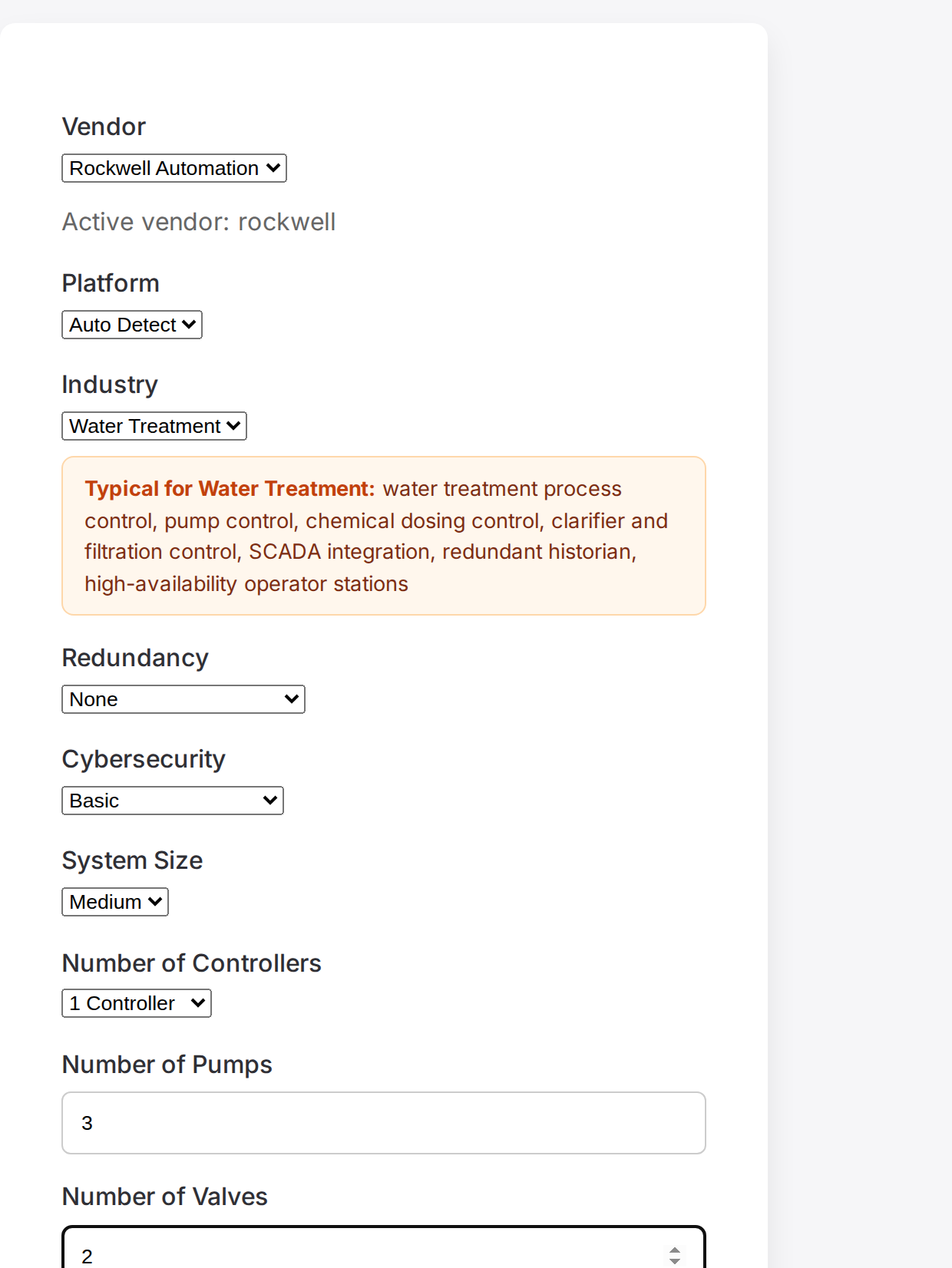
📄 See the Whole Report (PDF)Step 1 is a single project definition — vendor, platform, industry, redundancy, security, controller/pump/valve counts and architecture options — filled in once. Steps 2 and 3 reuse all of it automatically; you never redescribe the project.
The PDF report includes a cost estimate (CAPEX). By default it uses ballpark European prices. To use your own supplier prices instead, click 💶 Customize Hardware Pricing next to the report button after Step 3. You can set prices for controllers, I/O racks and cards, power supplies, UPS units, cabinets, network switches, operator and engineering stations, firewalls and drives, as well as your engineering hourly rate and contingency %. Leave a field blank to keep the default price for that line.
Your price list is remembered in your browser and saved with your project. Available on the Pro and Team plans. On the Free plan the report uses the default prices. See plans
The design steps need a free account. Enter your work email and click Sign in with email. We send you a one-time sign-in link. Open it on the device where you use Aicon, and you're signed in. No password and no credit card. If the email doesn't arrive within a few minutes, check your spam folder.
Why we ask for your email:
Want to look before you sign up? (with diagram and PDF report). No sign-in needed.
We use your email only to sign you in and for service messages such as receipts and team invites. We don't sell it or use it for advertising. Privacy policy
Start free. Upgrade whenever you outgrow the monthly limit.
€0/month
€69/month
€49/seat/month
No credit card required to start free. Manage or cancel anytime from your billing portal.
Define your project once here — Steps 2 and 3 reuse everything below automatically, instead of asking you to redescribe the same project three times.
Active vendor: Siemens
Architecture options
Security add-ons
Communication data (optional)
Leave these blank to use automatic estimates. Add your installed values when the defaults are not representative.
Uses the project definition from Step 1 — no need to redescribe the equipment here. Every generated point is automatically checked for implausible signal addresses and channel assignments — flagged inline (⚠) for you to review, not silently trusted.
Uses the project definition from Step 1, plus the I/O counts from Step 2 if generated (for the most accurately sized racks/modules). DCS platforms (PCS7, 800xA, etc.) use a fixed vendor topology regardless of I/O count.
Ready to share this design? Combine everything from Steps 1–3 into one document.
Now that your solution is designed, get a quick estimate of potential energy savings for it — no extra setup required, independent of the design above.
Have an installed system already? Upload a PDF or DXF drawing (network architecture, P&ID, or fieldbus layout) and get a structured equipment/connection list extracted by AI, for you to review and correct. PDF (up to 32 pages) or DXF (single sheet) — independent of the design steps above.
🔒 Before you upload: this drawing is analyzed by a cloud AI service (OpenAI), not processed on your own network. If it shows real IP addresses or other sensitive network details, please redact or replace them with placeholder values first — the tool will still find IP-address-shaped fields and flag security-relevant patterns (like a public address on an OT-facing device) either way.
Engineering expertise for modern energy and industrial systems.
Energy efficiency analysis, consumption monitoring and optimization strategies.
Design industrial automation systems in minutes using vendor-specific engineering rules, AI-assisted architecture generation, and automated documentation.
Secure and reliable industrial communication infrastructure.
Industrial IoT platforms, predictive analytics and energy monitoring.
Technology solutions designed for modern energy systems.
Real-time monitoring and analytics for energy production and consumption.
Upgrade legacy automation systems to modern digital platforms.
Connect industrial systems using OPC UA, Modbus and modern APIs.
Aicon-Platform solutions support multiple industrial sectors.
Optimization project reducing plant energy consumption by 18%.
Design and deployment of secure industrial communication network.
Migration of legacy automation to modern digital platform.
Aicon-Platform is an AI and engineering consulting group focused on energy optimization, industrial automation and digital infrastructure.
Our mission is to help organizations improve operational efficiency, reliability and sustainability.